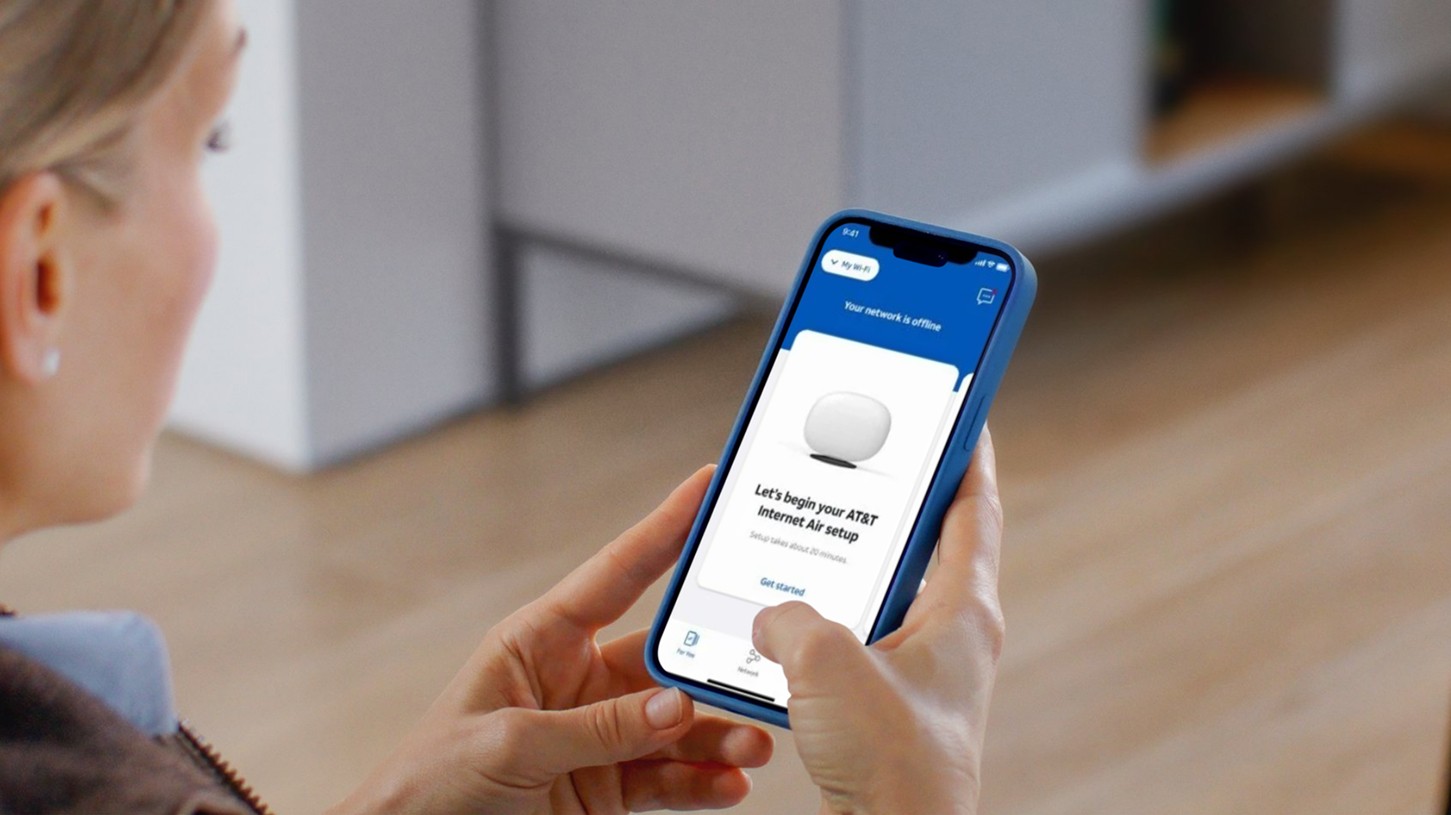
Enter password to view this project

Flagship Services & Devices
I led the redesign of how millions of AT&T customers access and manage their services, creating a new system that unified wireless and internet into a single, scalable experience.
Lead Product Designer
Services
Features
iOS
Flagship
App Design
Lander
Navigation
Turning a static entry point into a living service hub
Every AT&T customer lands somewhere when they open the app. For years, that somewhere was the Services Lander, a flat list that mixed primary services like Wireless and Home Internet with feature add-ons like Mobile Security and AT&T Connected Life, all at the same hierarchy level. No status. No context. No meaningful grouping.
The structural problem was real: customers don't think of Mobile Security as a standalone service. They think of it as something attached to their phone line. Presenting it alongside Internet and Wireless as if they were equals created a page nobody could scan, and buried the two relationships customers actually cared about. The lander was showing everything and communicating nothing.
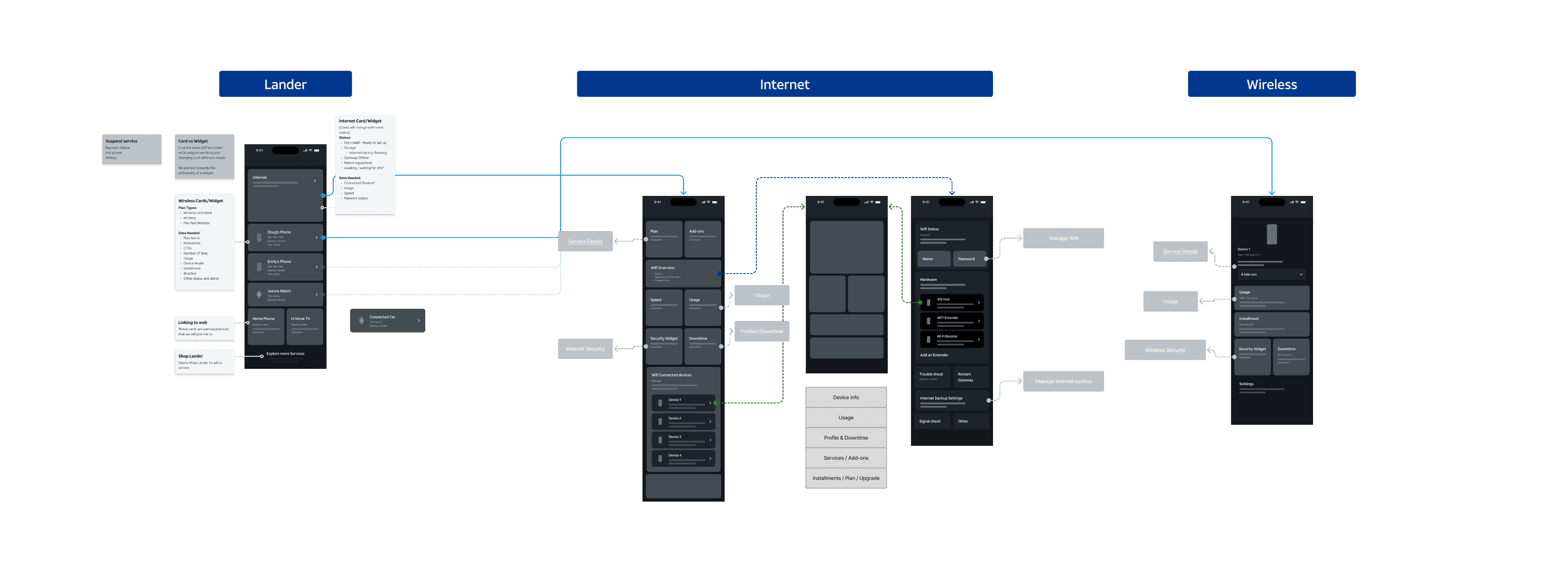
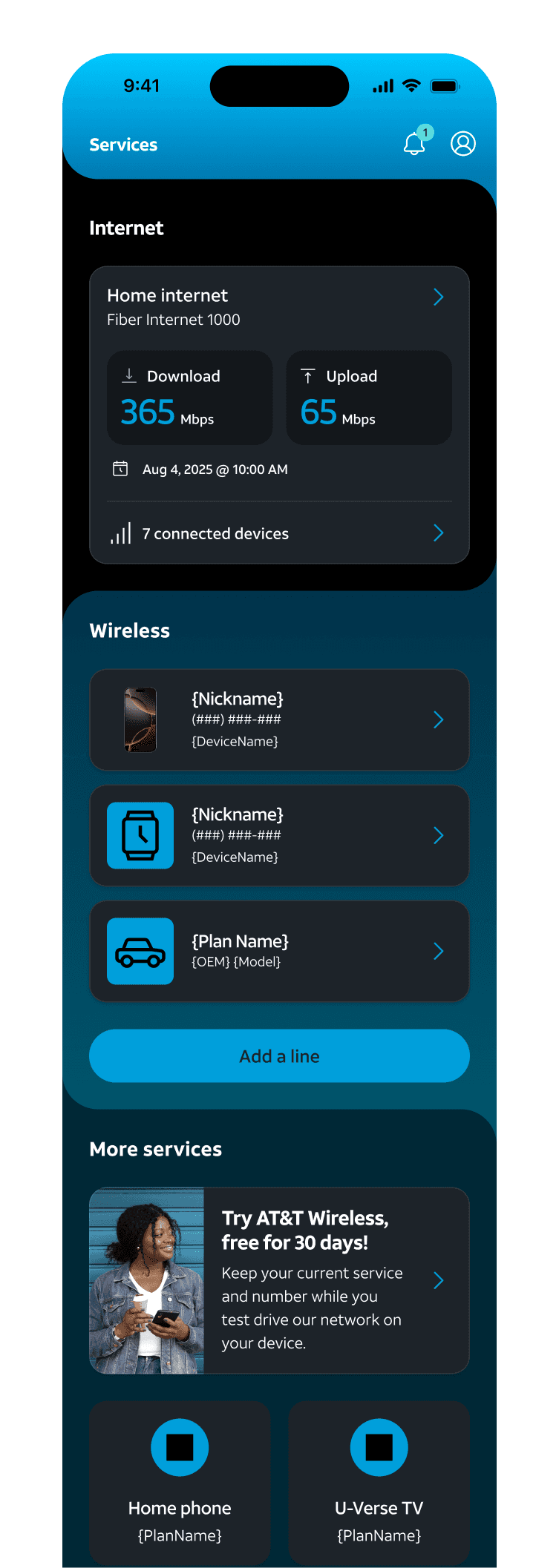
I restructured the IA top to bottom. The lander became a clean entry point for Wireless lines and Internet only, with contextual action items surfaced when a use case warranted them and helpful service info when everything was running normally. Add-ons and features moved under their parent service, accessible from the per-line detail pages. To do that, I had to define what lived on the new Wireless line details page and the Internet dashboard before either was redesigned. You can't build the entry point without knowing what's behind it. I later delivered both of those surfaces as part of the same flagship app. Those are covered in separate case studies.
My part

Company
AT&T
Role:
Senior UX Designer, Design Lead
Platform:
iOS & Android
Core Contributions:
UX/UI direction, research synthesis, feature strategy, user flows, design pattern creation, product roadmap
Impact
The shift from a static list to a dynamic, state-driven system had measurable impact:
App store rating
Increased from 4.2 to 4.8 stars following the redesign launch
Engagement
14% increase in overall app engagement post-launch
Task completion
12% increase in general task completion across services domain of the app
Design Patterns / Future proofing
IA pattern became the foundation for future AT&T service additions
My Approach · 01
Creating the System
Before touching a frame, I mapped the full existing experience. The lander wasn't just missing context, it was conflating two fundamentally different things: primary services and feature add-ons, presented at the same hierarchy level with equal weight.

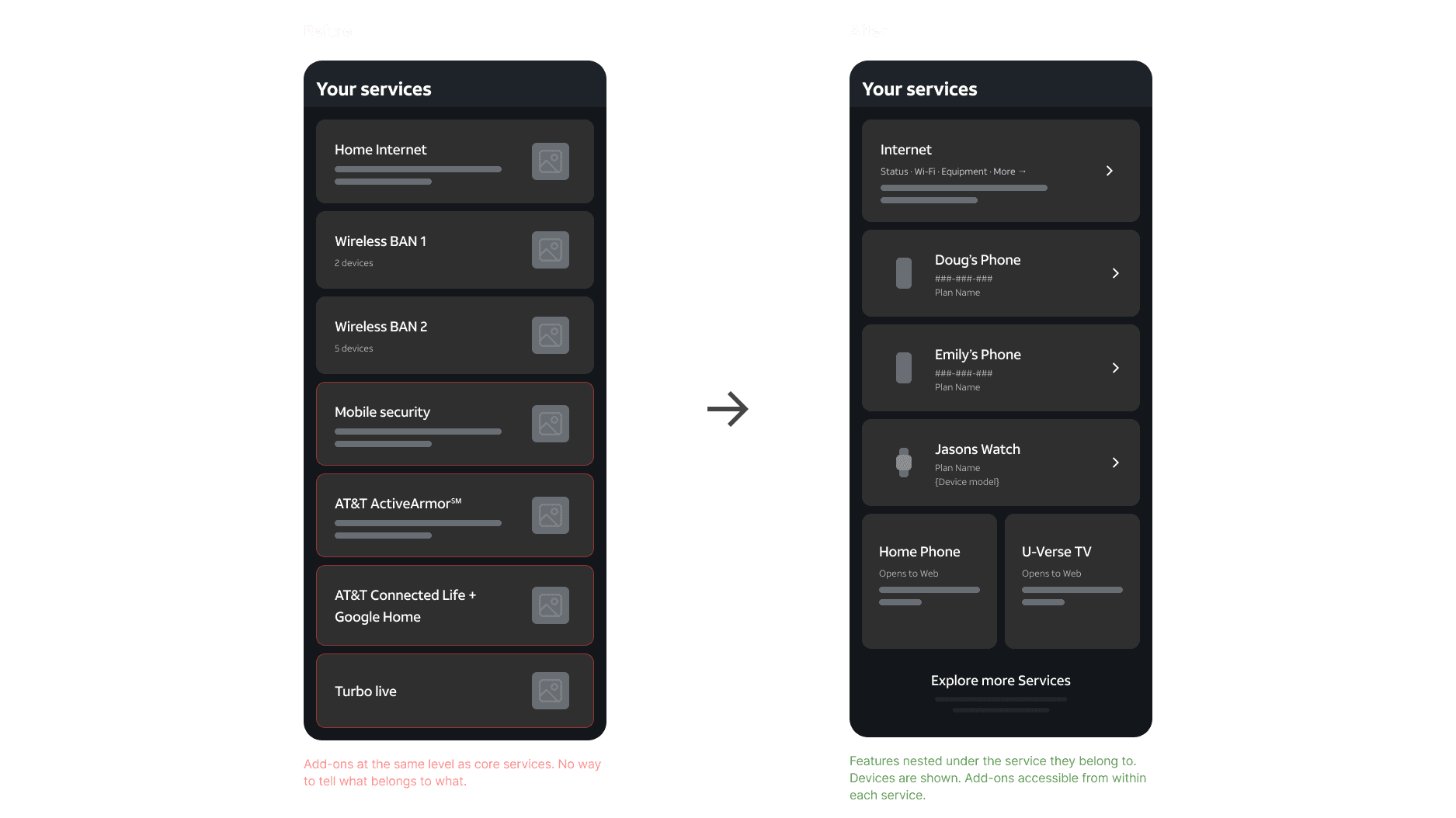
Identifying the real structural problem

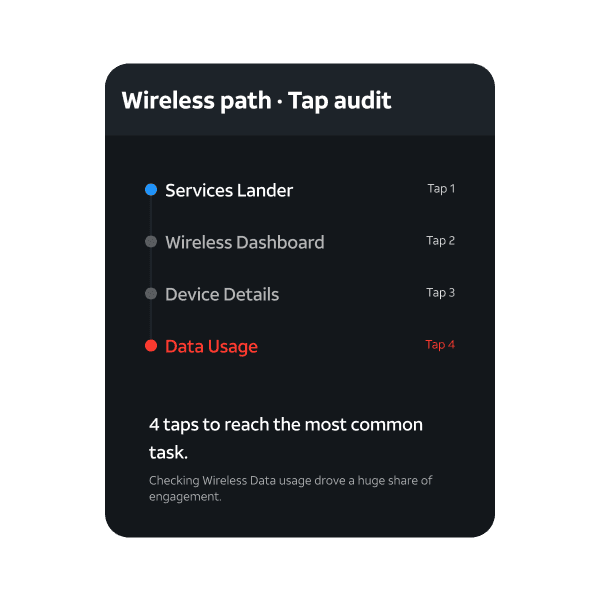
Auditing tap depth
Key tasks like checking data usage required four taps from the lander. That's a friction pattern that compounds at scale, especially for AT&T's highest-frequency customer tasks. Surfacing it early justified the IA changes that followed.
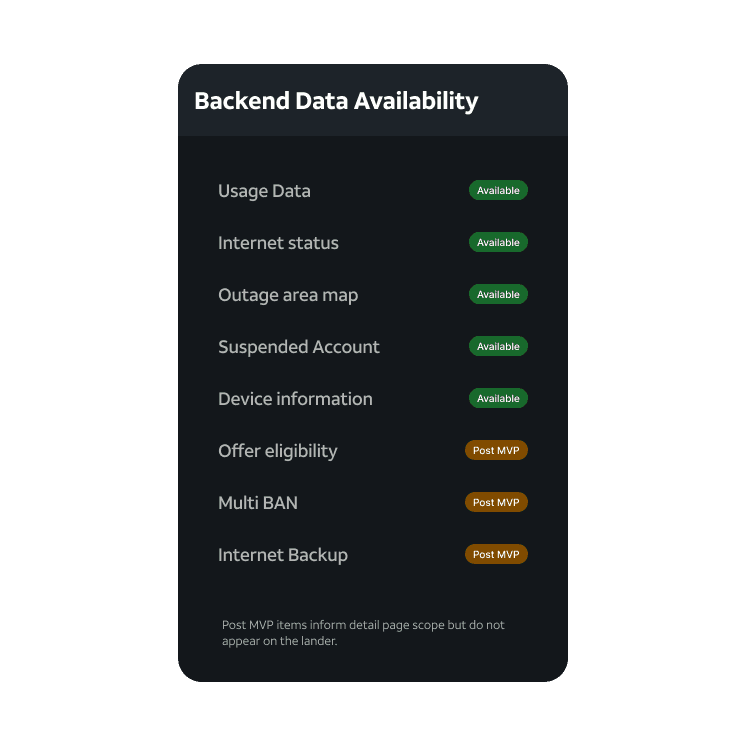
Translating backend data to UX constraints
Not everything is surfaceable at the lander level. Understanding what the backend could actually deliver early meant the IA I designed was grounded in what would ship, not aspirational work that would get cut later. This helped reduce churn.
My Approach · 02
The most consequential decision was restructuring the navigation model. Wireless and internet needed to be separated at the top level, then rebuilt beneath each to reflect how customers actually navigate those services.
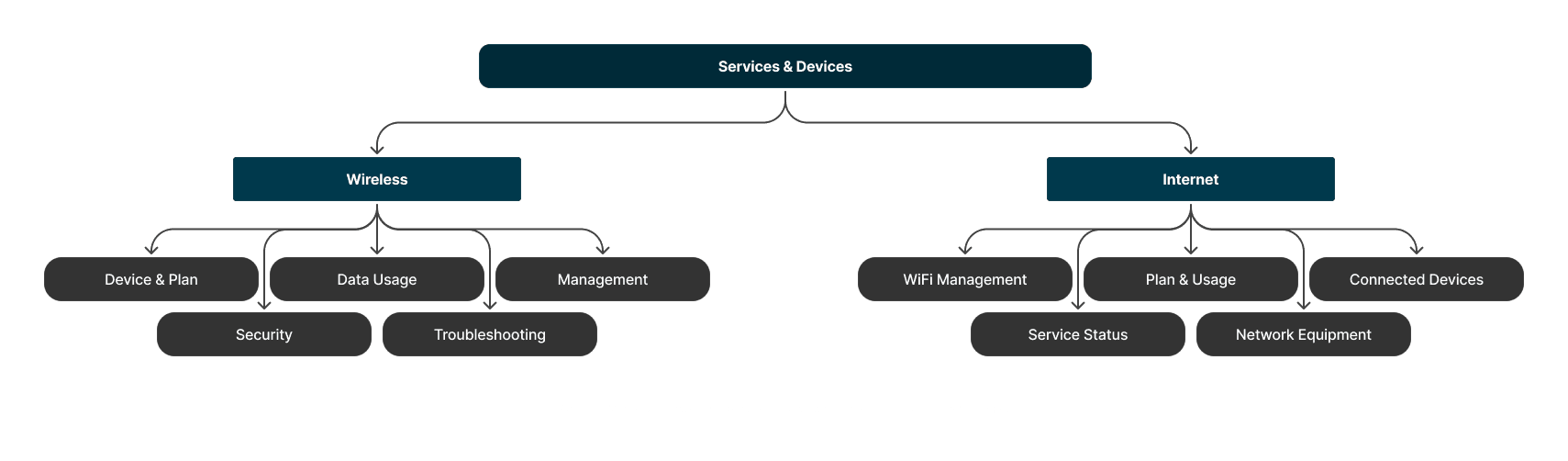
A new top-level navigation model

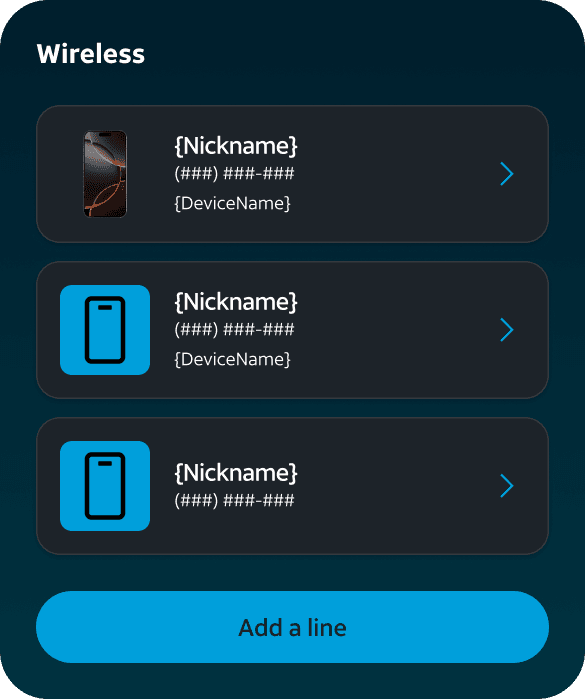
Device and plan, unified
Customers don't think of their phone and plan as separate objects. Combining them into a single contextual card (device, plan, and live usage in one surface, with actions available without going deeper) was the key structural decision here.

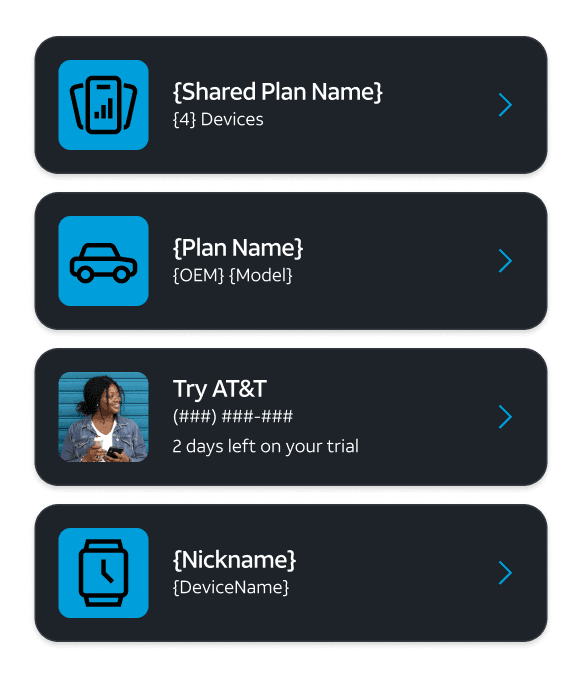
Accounting for every plan type
Not every wireless line is a smartphone on its own plan. The IA had to handle legacy shared plans (one plan, multiple lines accessed via a bottom tray), Connected Car lines, Try AT&T trials, data-only tablets and watches. Each needed its own card treatment and a clear path into the right detail page, without breaking the consistency of the lander.
My Approach · 03
Designing for Scale
A clean lander only works if the card adapts to what's actually happening with a customer's service. I mapped every use case across both internet and wireless, then designed the card pattern to respond to each, surfacing the right information and the right action without changing the underlying structure.

Internet Service card variations
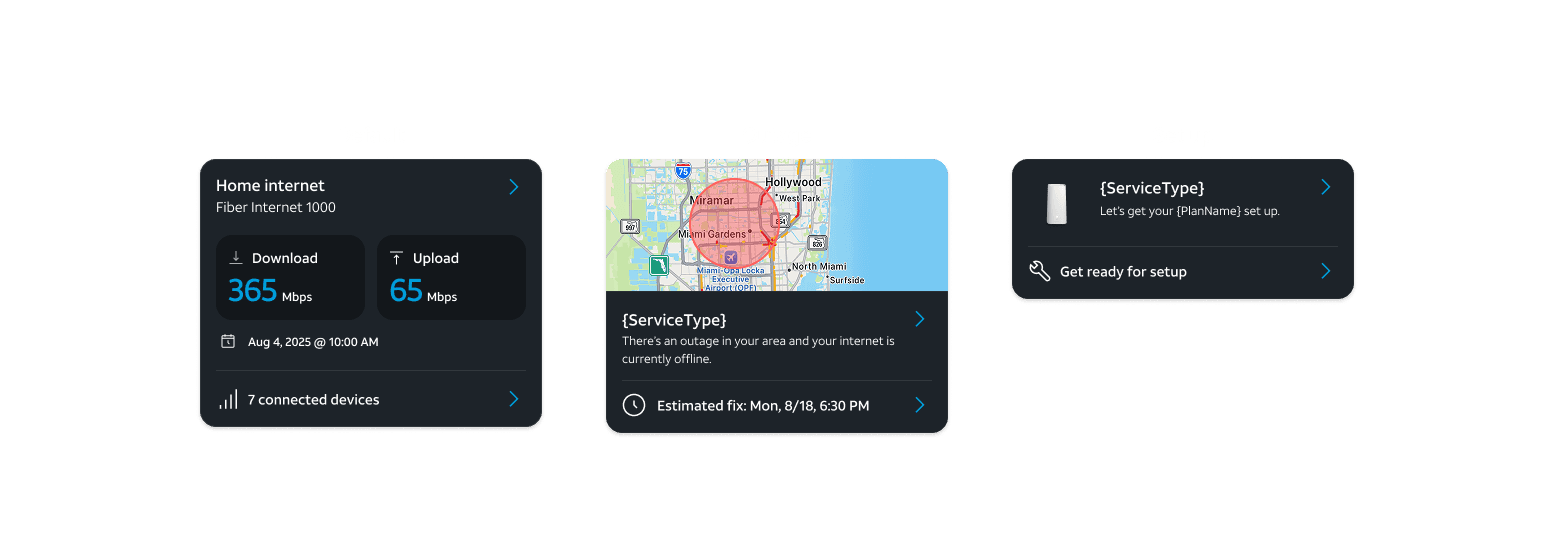
One card pattern, every use case
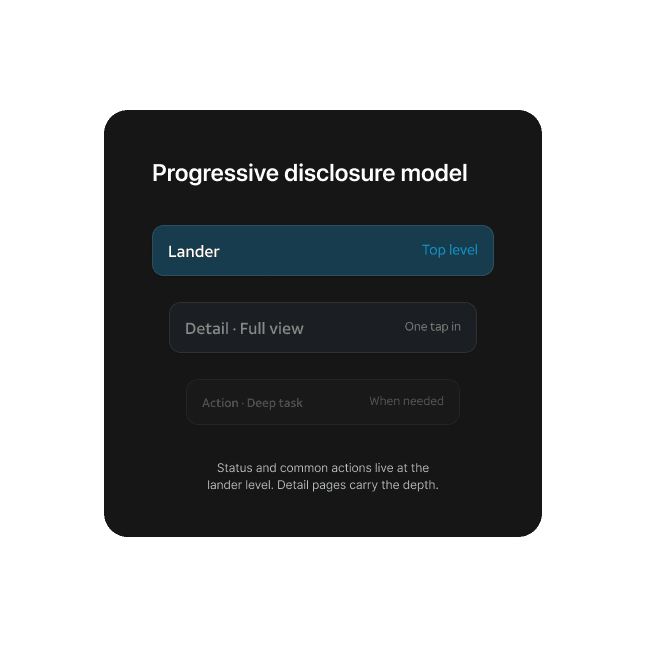
Progressive disclosure as the core model
The lander is a summary layer. Status and the most common actions live here. Detail pages carry the depth. That hierarchy needed to be explicit in the IA so future teams extending the pattern couldn't collapse it.
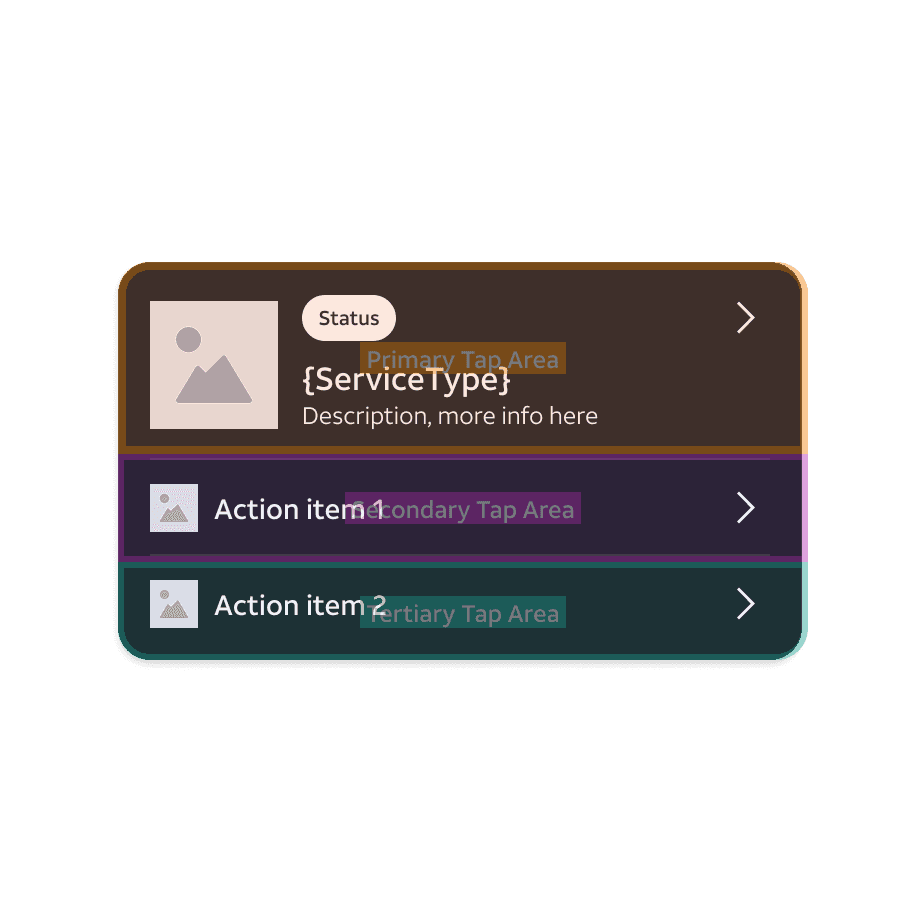
Built to extend
AT&T's service catalog will keep growing. The entry card was designed as a reusable structural pattern: service type, name, live status, contextual actions. Future products plug in without a major redesign cycle.
What made this hard
Core Design Challenges
01
Unifying wireless and internet without flattening them
Both services live on the same lander but operate on completely different logic. One is device-centric. The other is location-centric. The IA had to hold both without making either feel like an afterthought.
02
Designing for every account configuration
AT&T customers range from a single phone line to a five-device family plan with fiber and mobile backup. The lander had to scale gracefully across all configurations with no broken layouts, no missing states, no one-size-fits-all compromise.
03
Making a management page feel alive without overwhelming it
Surfacing real service status without alarming customers who just want to check their bill required careful hierarchy work: what's urgent, what's informational, and what stays hidden until it's relevant.
04
Aligning the IA to customer mental models, not internal org structure
AT&T's product org doesn't map to how customers think about their services. Getting the new navigation model approved required more stakeholder facilitation than design work, holding the line on decisions that were right for users but uncomfortable internally.
Key Decisions
Redefined what the whole services IA would look like for years to come. These were the calls that shaped the direction.

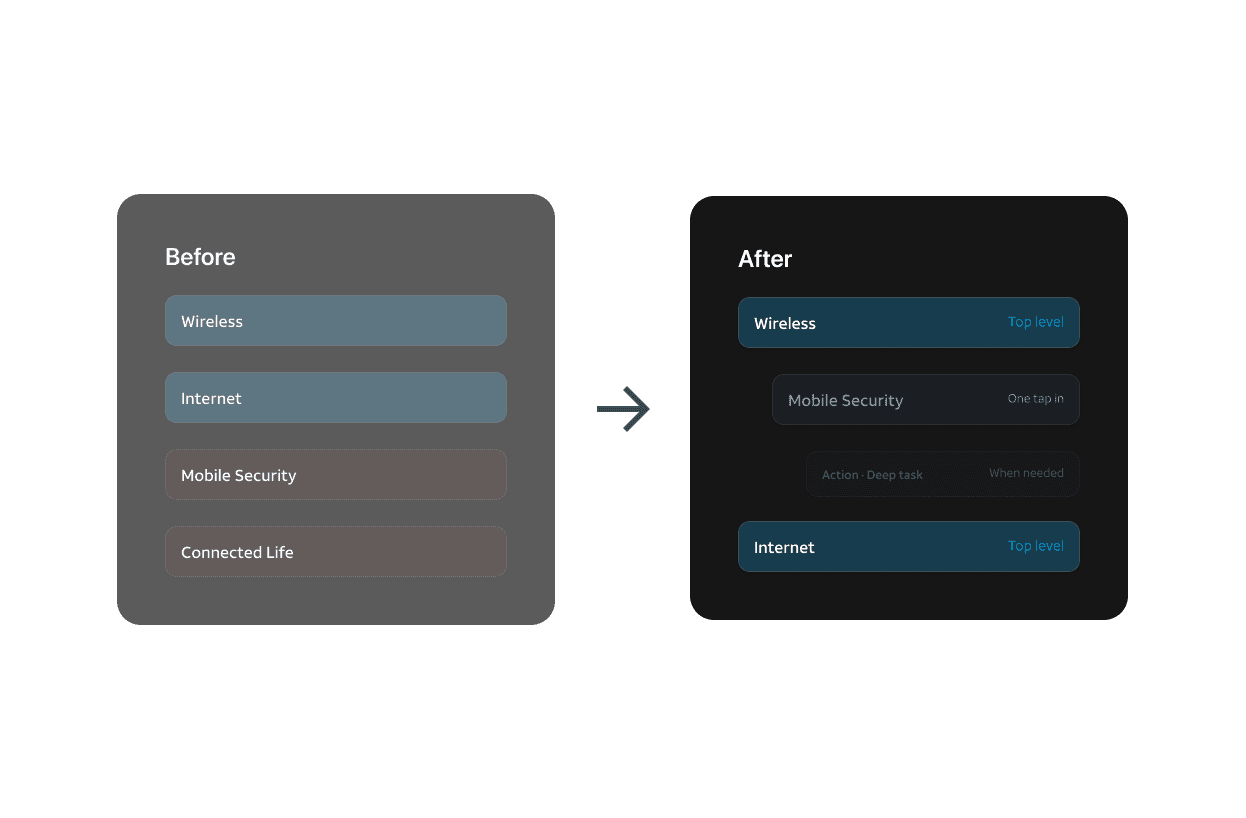
Decision 01
Moving add-ons from the top level
The call
I removed services like Mobile Security and AT&T Connected Life from the lander entirely, not because they're unimportant, but because they only exist in relation to a primary service. They now live within the Wireless line details page or the Internet dashboard, where the parent context makes them meaningful.
Why it mattered
Presenting add-ons at the same level as Wireless and Internet implied they were equivalent and made the lander impossible to scan. Customers don't have a mental model for Mobile Security as a standalone service. They think of it as part of their phone line. The IA should reflect that, not fight it.
Decision 02
Live service status at the lander level
The call
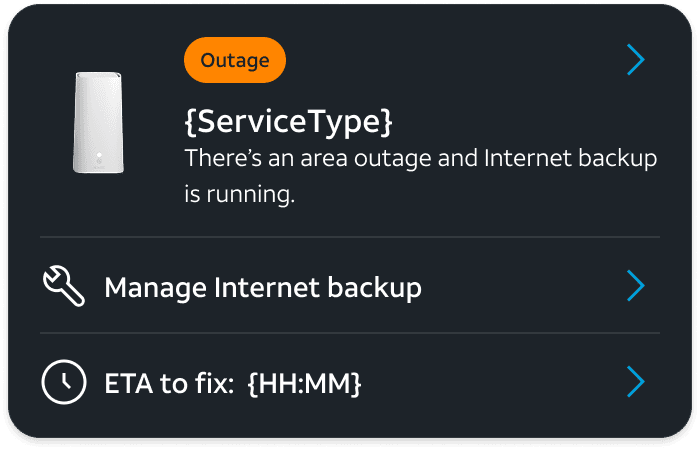
I pushed to surface real-time service state (outages, setup prompts, degraded performance) directly on the lander card, not buried in a detail page customers would have to navigate to during a service disruption.
Why it mattered
When a customer's internet is down, opening the app is their first move. If the lander shows nothing unusual, they assume the problem is theirs. Surfacing the outage state immediately answers the question before they have to ask it, routing them to resolution without friction.

Decision 03
Customer mental models over internal org structure
The call
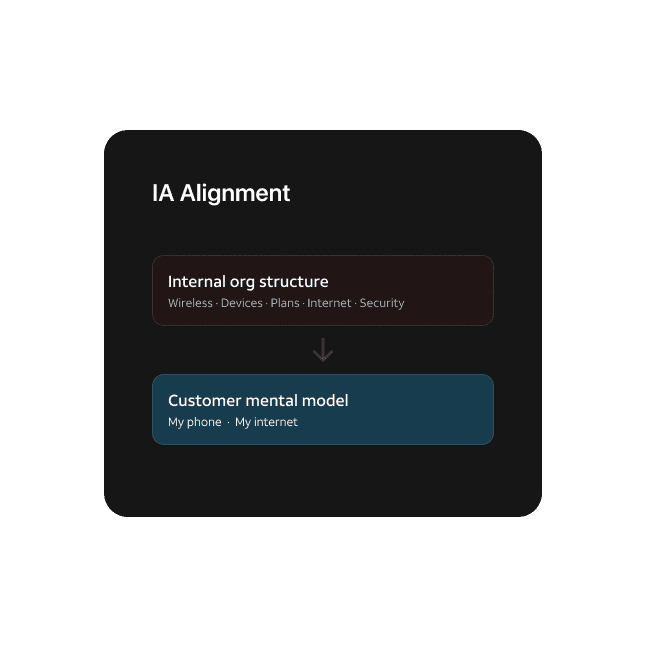
The IA I built doesn't map cleanly to how AT&T is organized internally. That was intentional, and it required holding the line through multiple rounds of stakeholder feedback from teams that had ownership stakes in the existing structure.
Why it mattered
Customers don't know or care how AT&T's product org is structured. They think "my phone" and "my internet." An IA built around internal boundaries creates a navigation decision point at every screen. The push-back was real; so was the outcome when we measured it.
How I Worked
The thinking behind the work
Getting alignment before getting to work
Multiple teams had ownership stakes in the existing structure. Before I could change anything, I had to make the problem legible to people who didn't experience it as a problem. That meant mapping the current state in enough detail that the gaps were hard to argue with, then framing the proposed IA in terms of customer outcomes rather than design preferences.
Defining scope across three surfaces upfront
You can't design a clean entry point without knowing what's behind it. Early in the project I worked with product and engineering to define what belonged on the Wireless details page and the Internet dashboard, even though neither was being designed yet. That groundwork is what let the lander IA hold up under scrutiny and avoided rework later.
Working within backend constraints, not around them
Some of the most useful early work was understanding what data was actually available to surface at the lander level. I mapped backend capabilities against UX intent before committing to any patterns. That kept the design grounded and gave engineering confidence that what we were building was deliverable.
Knowing which decisions to fight for
Not every pushback was worth engaging. I picked the structural decisions that would be costly to reverse later (the IA hierarchy, the removal of add-ons from the top level) and held the line on those. Smaller things I let flex. That distinction matters when you're working inside a large org with a real deadline.
Communicating design as a systems problem
The lander touches wireless, internet, billing, device management, and network operations. Getting buy-in meant speaking each team's language. I presented the same IA decisions differently depending on the audience, framing for customer impact with product, technical feasibility with engineering, and brand consistency with marketing.

The breath of work
The full page delivery covers the lander across every service state, account type, and edge case, fully annotated and documented for handoff. Every component was built with the understanding that it needed to live beyond this screen.
AT&T was building a new design system alongside the flagship app, not before it. That meant every pattern I contributed had to be intentional enough to become a reference point for teams working across the product. Brand compliance wasn't a checklist. Color, typography, imagery, and language all had to be exact. The patterns I built were designed to scale, documented clearly enough that other teams could adopt them without a handoff conversation, and flexible enough to support whatever came next.
Looking back
Reflection
What this project actually required, what I'd do differently, and what it demonstrates about how I work.

What made it hard
Alignment over aesthetics
The hardest part of this project wasn't the design. It was getting the IA approved. AT&T has strong internal opinions about how its products should be grouped and surfaced. The structure I built didn't map cleanly to any existing team boundary, which was exactly the point. Getting there required more facilitation than wireframing, more stakeholder sessions than design reviews. That's the reality of senior work at this scale.
What I'd refine
Personalization is the next real problem
A lander that learns what a customer actually touches and surfaces that first is the obvious next step. A customer who checks data usage every other day shouldn't have to scroll past the internet card to get there. I planted the structural seeds, but personalization didn't make it into this cycle. That's the work left to do.
What this work shows
Systems thinking, IA leadership, designing for scale
This isn't a screen redesign. It's a foundational restructuring of how millions of people navigate their relationship with AT&T's services. Defining the lander IA required thinking two levels deep. I had to define what belonged on the Wireless line details page and the Internet dashboard before either existed, so the entry points made sense. Both of those surfaces were later designed and delivered as part of the same flagship app.