S
J


Microsoft Sales Channel
Building a sales channel that connects Shopify merchants directly to millions of high-intent shoppers across the Microsoft network.
Partnership Design
Sales
Advertising
Dashboard
Building a sales channel at the intersection of two platforms
With the acceleration of digital commerce, Shopify merchants needed a faster path to new customers. Microsoft's ad network spanning Bing Search, the Microsoft Audience Network, and the Bing Shopping tab, was a massive, underutilized opportunity for them.
The friction wasn't interesting. It was access. Setting up Microsoft Advertising required leaving Shopify entirely, navigating a separate platform, and manually syncing product catalogs. Most merchants never made it through.
I served as the Lead Product Designer on the Microsoft Advertising side, responsible for the end-to-end merchant experience while acting as the primary design liaison with Shopify's internal team. I partnered with product and engineering on both sides to identify which features delivered meaningful user value while balancing development complexity, dual design system constraints, and a hard partnership launch date.
My part

Company
Microsoft
Role:
User Experience Designer
Platform:
Cross-platform / Web
Core Contributions:
UX/UI direction, cross-org collaboration, merchant onboarding flows, design system translation, campaign creation UX, performance reporting
Impact
Improved merchant activation
Simplified onboarding and reduced friction helped more merchants successfully launch and manage the channel
Enabled multi-channel distribution
Connected merchant products to Microsoft Bing and the Microsoft Advertising ecosystem through a more seamless integration experience
Increased ongoing engagement
Clearer workflows and guidance encouraged merchants to actively manage listings and create campaigns
Focusing on new users
Onboarding
The biggest design challenge was collapsing a complex, multi-step account setup into a flow merchants could complete in minutes without leaving Shopify.
Account connection or creation
Merchants needed to connect their Microsoft account or create one directly inside Shopify. If they had not created a Advertising account, they would also go though that set up.


Onboarding Check List
In order for the user to start advertising they need to complete specific steps.
Clicking each step would take them to the page in order to complete them. When they returned to the sales channel page it would check to see if they had completed it and then update the checklist.
The final step just required the user to confirm that they had information on their store.
Microsoft ads account sync/creation
To sync data and products from the Shopify Merchant store user need to log onto a Microsoft Advertising account. For user that needed to create an account we created a flow right within the sales channel.
Sign up or Sign in
Sync your account
Microsoft Advertising needs you to sign in or setup your Microsoft Advertising account.
Sign In
Create New
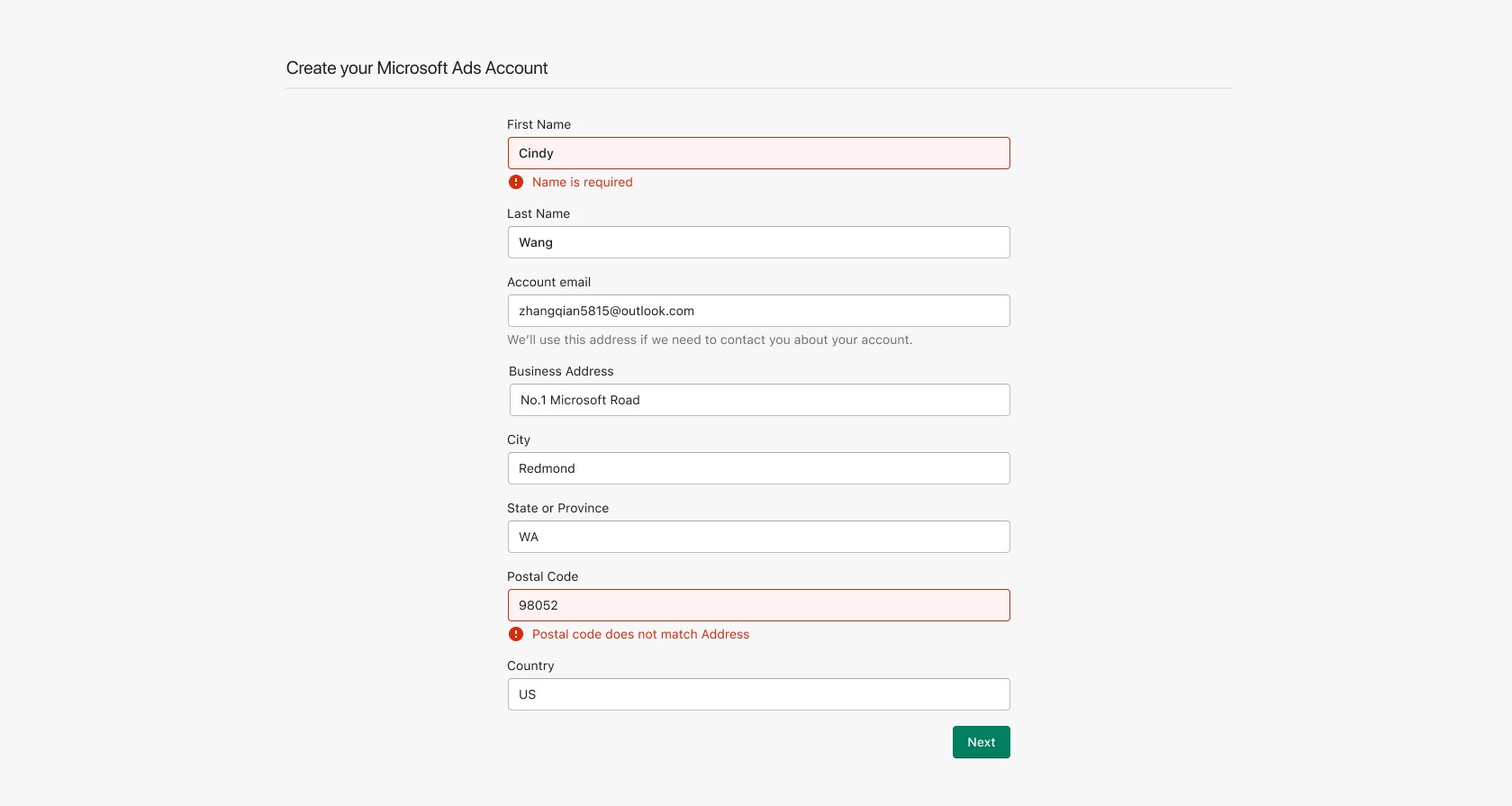
Basic account information to setup Microsoft Advertising account.
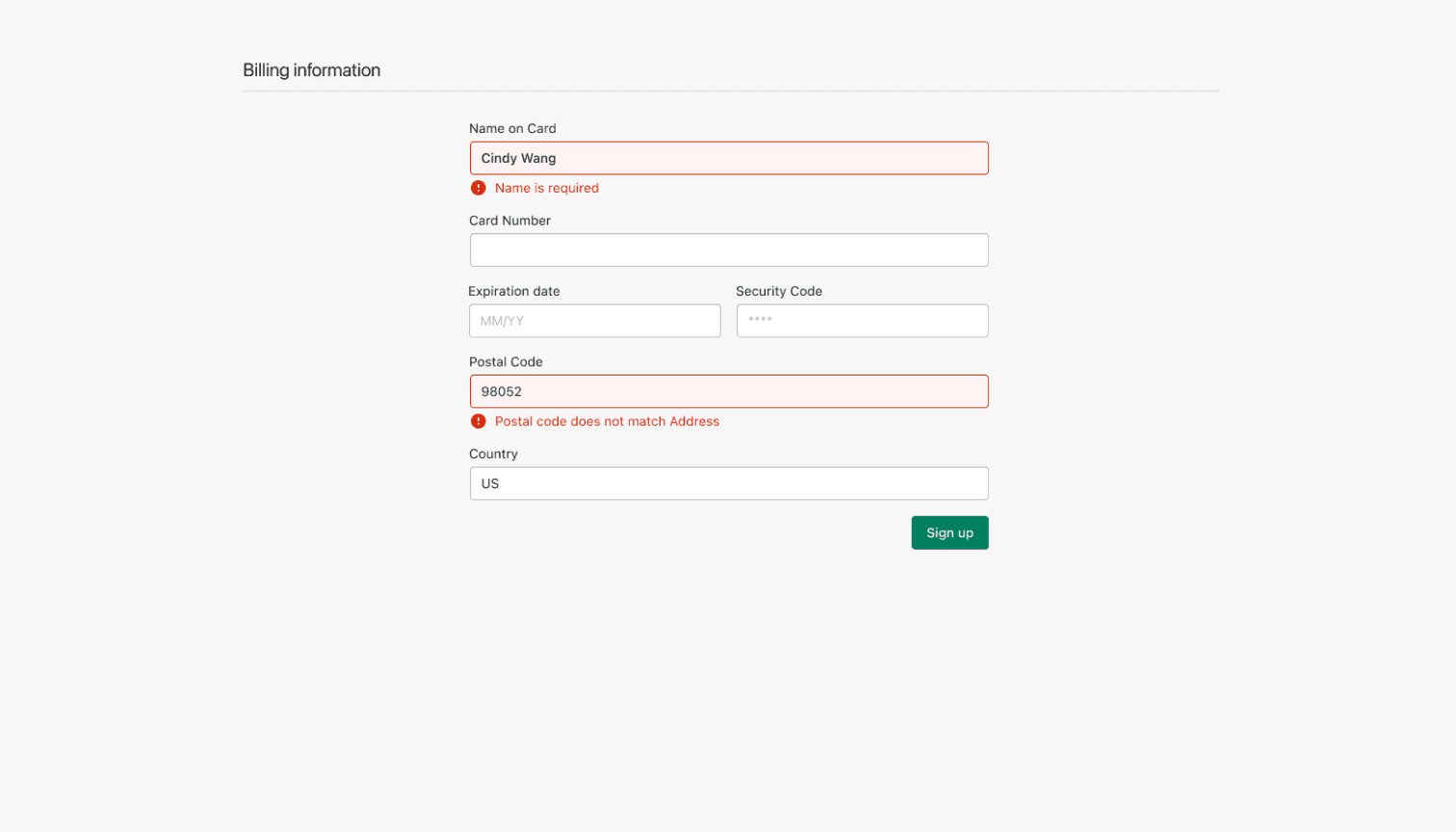
Form to collect billing information so users can start advertising right away.
Auto Connect to MMC Store
In order to start advertising, the user needed to complete the following steps. While they could do it out of order, the business objective was to get payment method first so they could easily start advertising. Once they completed the checklist, it would collapse and show as complete.
Get Started with Free Listings & Create your Microsoft Merchant Store
Product Feed/Free Listings
Free - Let us do the work for you
Sync product data to Microsoft Merchant Center, and your products will appear across Microsoft
Learn More
Get Started
A permissions screen asking for the sales channel to access the stores product information would show. Once accepted the section would update to show the list of products they could advertising.
“Store Name”
Free - Let us do the work for you
Sync product data to Microsoft Merchant Center, and your products will appear across Microsoft.
Approved
0 products
Pending
0 products
Not approved
0 products
Streamlining advertising store products
Product Listing & Campaigns Management
Product catalog management sits at the core of the merchant experience. Merchants need visibility into what's approved, what's disapproved, and why without a support ticket.
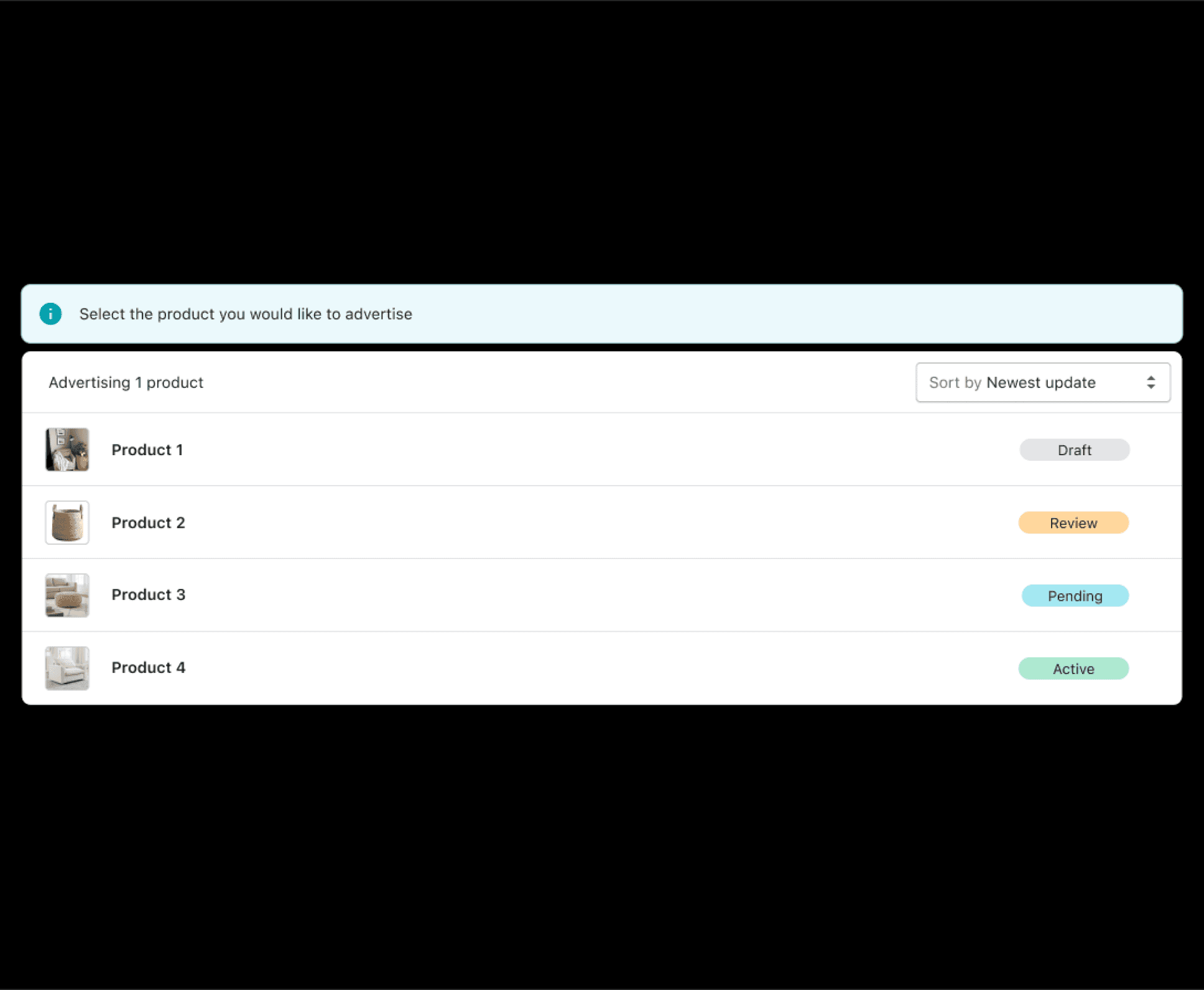
Product list
When merchants connected their Shopify store, their product catalog synced automatically to Microsoft Advertising. But that sync process wasn't instant, and the status of any given product wasn't always clear.
This screen gave merchants a live view of every product in their catalog and where it stood in the review process, replacing what would have otherwise been a black box.
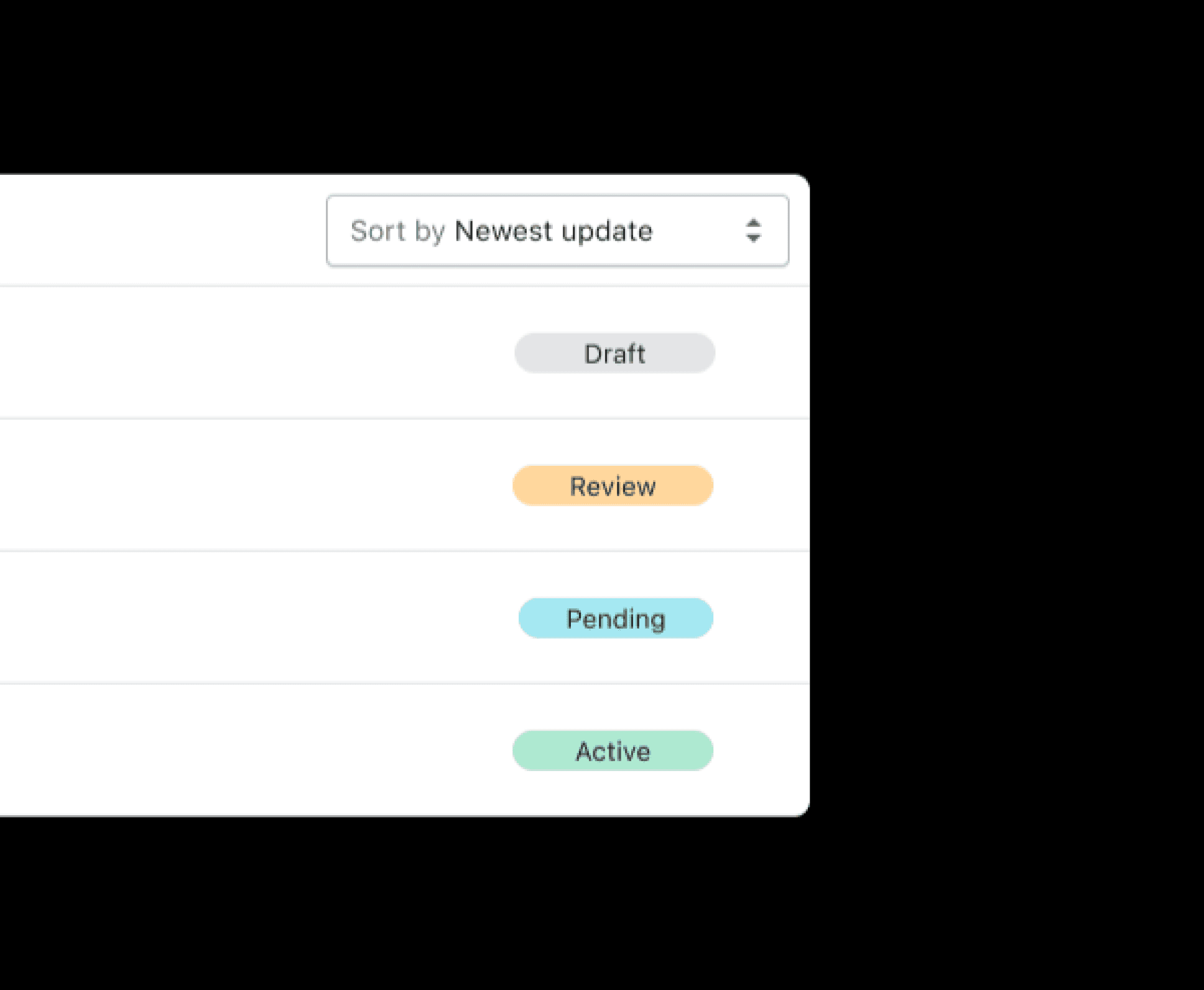
Status tracking
The status badge system, Draft, Review, Pending, and Active, made it easy to see exactly where each product was at a glance. Merchants could sort by newest update to quickly surface anything that had recently changed, which was especially useful for larger catalogs.
The screen stayed intentionally read-only. Edits lived in Shopify, not here. That was a deliberate call to keep the surface focused and avoid duplicating functionality that already existed one tab away.
Campaign Creation
We kept campaign creation to the essentials. Merchants could set their budget, targeting, and ad type in one linear form and get a campaign live without needing to understand everything Microsoft Advertising is capable of.

Management
From the Campaign Page, merchants could view and manage all active campaigns in one place. Controls like pause, edit, and delete were accessible from a simple dropdown, keeping common actions fast without cluttering the interface.
For advanced settings, we intentionally directed users to the Microsoft Advertising dashboard. Scoping what lived in the Shopify experience versus what belonged in the full platform was one of the more important calls on this project. Doing too much would have made both worse.
Performance
At the top of the Campaign Page, merchants got an immediate read on how their ads were performing across all active campaigns. They could also dig into individual stats like clicks, impressions, cost, and conversions, and sort by whatever metric mattered most to them at that moment.
The goal was to give merchants enough signal to make a decision without sending them elsewhere to find it.
Settings
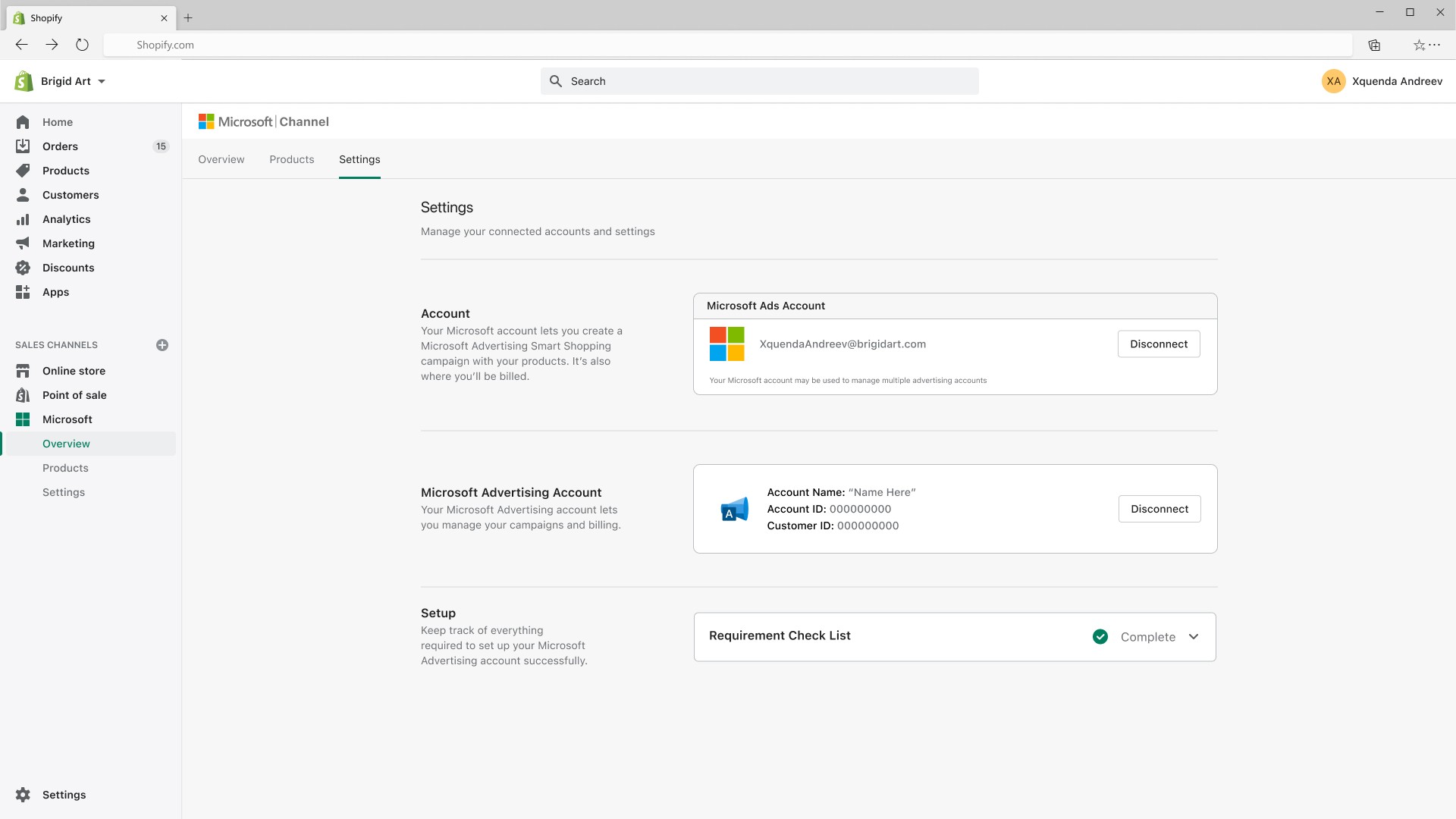
Settings are where trust lives. Merchants need to know their accounts are connected and their setup is complete. This page answered both questions without getting in the way.
Account and connection management
The Settings page gave merchants a single place to confirm their Microsoft account and Microsoft Advertising account were connected correctly. It also surfaced a post-setup checklist so merchants could verify everything was in order before their campaigns went live.
This was intentionally a lightweight page. The surface didn't need to do much because the heavy lifting happened during onboarding. Keeping it simple was the right call for a page most merchants would visit once and rarely return to.
Impact
+21%
Campaign creation rate
+2%
Click-through rate (CTR)
+7%
Merchant return rate

+18%
-32%
-24%